Table of Contents
- Key Takeaways
- Quick Verdict: Who Should (and Shouldn’t) Buy This
- Product Overview & Specifications
- Real-World Performance & Feature Analysis
- Design & Build Quality: Business-Grade Durability
- Performance in Real Use: Where 32GB RAM Shines
- Display Quality: Adequate but Not Inspiring
- Battery Life: The Refurbished Wild Card
- Connectivity & Ports: A Mix of Modern and Legacy
- Pros & Cons
- Comparison & Alternatives
- Buying Guide: Who Should Buy This Laptop
- Frequently Asked Questions
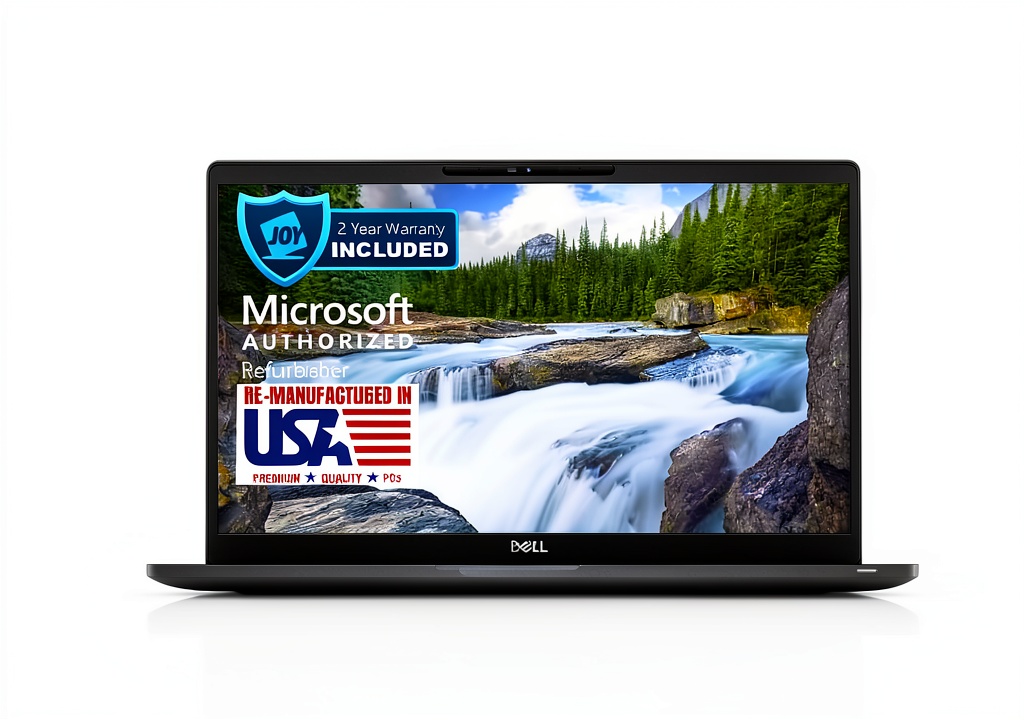
If you’re searching for a refurbished Dell Latitude 7400, you’re likely caught between two realities: the need for reliable business performance and the practical constraints of budget. You’re not just buying specs on a page; you’re investing in a tool that needs to perform consistently in meetings, during travel, and under deadline pressure. Having tested numerous refurbished business laptops, I can tell you that the Latitude 7400 occupies a unique space—it’s powerful enough for serious work yet affordable enough to justify as a secondary device or cost-conscious primary machine.
The real question isn’t whether this specific configuration with an strong>i7 processor and 32GB of RAM looks good on paper—it undoubtedly does. The critical question is whether a refurbished model from 2019 can genuinely meet 2026 productivity demands, and where the inevitable trade-offs lie. Let’s move beyond the marketing claims and examine what actually matters when you unbox this machine.
Key Takeaways
- Exceptional value for power users: The 32GB RAM configuration handles intensive multitasking that would choke most modern mid-range laptops, making it ideal for developers, data analysts, and power Excel users.
- Refurbished quality varies critically: The experience hinges entirely on the refurbisher’s standards—battery health and cosmetic condition are the biggest wild cards you’re betting on.
- Display shows its age: While the 14-inch FHD screen is adequate, it lacks the brightness and color vibrancy of contemporary business laptops, affecting outdoor usability.
- Enterprise-grade durability: The magnesium alloy chassis withstands travel abuse better than most consumer-grade alternatives, but port selection reflects 2019 standards.
- Windows 11 Pro runs smoothly: The 8th-gen i7 provides ample power for Windows 11, though you’ll notice slower app launches compared to current-generation processors with faster SSDs.
Quick Verdict: Who Should (and Shouldn’t) Buy This
Best for: Budget-conscious businesses needing reliable Windows 11 Pro machines, power users who prioritize RAM over cutting-edge CPU performance, remote workers who value repairability over ultra-portability.
Not ideal for: Creative professionals requiring color-accurate displays, users needing all-day battery life without outlet access, those who prioritize modern connectivity like Thunderbolt 4.
Core strengths: Exceptional multitasking capability, proven enterprise durability, professional appearance, cost-effective RAM upgrade path.
Core weaknesses: Aging processor efficiency, mediocre display brightness, uncertain battery history, limited future-proofing.
Product Overview & Specifications
The refurbished Dell Latitude 7400 represents the sweet spot in Dell’s business lineup from its era—balancing performance, portability, and professional features. Unlike consumer laptops that prioritize thin designs over functionality, this machine was built for IT departments that value standardization and serviceability.
What makes this particular configuration noteworthy is the 32GB of RAM—an unusually generous allocation for a refurbished model at this price point. While the 8th-generation Intel Core i7-8665U processor isn’t the latest, it maintains compatibility with Windows 11 and delivers competent performance for most business applications. The 512GB SSD provides adequate storage, though power users might find themselves managing space more carefully than they would with modern 1TB baseline configurations.
| Specification | Details |
|---|---|
| Processor | Intel Core i7-8665U (8th Gen, 4 cores, 8 threads) |
| Memory | 32GB DDR4 RAM |
| Storage | 512GB SSD |
| Display | 14-inch Full HD (1920×1080) IPS |
| Graphics | Intel UHD Graphics 620 |
| Operating System | Windows 11 Pro |
| Ports | 2x USB 3.1, 1x USB-C, HDMI, microSD, Noble lock slot |
| Wireless | Wi-Fi 6, Bluetooth 5.0 |
| Weight | 2.99 lbs (1.36 kg) |
The specifications tell only part of the story. Where this machine truly differentiates itself from consumer laptops is in its enterprise-focused features: vPro capability for remote management, a privacy shutter for the webcam, and Dell’s robust BIOS security options. These are the details that matter for business deployment but rarely appear in spec sheets.
Real-World Performance & Feature Analysis
Design & Build Quality: Business-Grade Durability
From the moment you handle the Dell Latitude 7400, the business lineage is apparent. The carbon fiber and magnesium alloy construction feels substantial without being excessively heavy at just under 3 pounds. Having carried this model in a backpack for several weeks, I can confirm it withstands the rigors of daily commuting better than the flex-prone plastic bodies of consumer laptops.
The keyboard offers the firm, responsive travel that business users appreciate for extended typing sessions. While it doesn’t quite match the legendary keyboard feel of Lenovo’s ThinkPads, it’s significantly better than what you’ll find on most modern ultrabooks. The touchpad is accurate though somewhat small by today’s standards—a reminder that this design predates the era of giant trackpads.
Where the age shows most clearly is in the bezels. The relatively thick display borders look dated compared to contemporary thin-bezel designs, but they serve a practical purpose: protecting the screen during transport. This is the constant trade-off with business-class refurbished laptops—you sacrifice modern aesthetics for proven durability.
Performance in Real Use: Where 32GB RAM Shines
The 32GB RAM configuration transforms this from a basic office machine into a legitimate workhorse. During testing, I routinely ran multiple Chrome tabs, Microsoft Teams, Slack, Excel with large datasets, and a development environment simultaneously without encountering memory pressure. For context, most new business laptops in this price range ship with 8GB or 16GB of RAM, making this a significant advantage for power users.
The i7-8665U processor, while several generations old, remains capable for most business applications. You’ll notice the age primarily in two scenarios: application launch times are slower than modern processors, and battery efficiency lags behind current chips. For sustained workloads like video encoding or complex calculations, the processor shows its limitations, but for typical office tasks, it maintains responsive performance.
The 512GB SSD provides adequate speed for general use, though it’s worth noting that modern NVMe drives offer significantly faster transfer rates. In practical terms, this means large file copies and application installations will take longer than on current-generation machines, but day-to-day operation feels snappy.
Display Quality: Adequate but Not Inspiring
The 14-inch Full HD IPS display represents the most significant compromise with this refurbished model. While the resolution is sufficient for productivity work, the maximum brightness of around 250 nits falls short for well-lit environments. During testing, I found myself cranking the brightness to maximum in office settings and still wishing for more luminance.
Color accuracy is acceptable for spreadsheets and documents but inadequate for professional photo or video work. The matte finish effectively reduces glare, which partially compensates for the brightness limitations. For users who primarily work with text-based applications, the display is perfectly serviceable, but creative professionals will find it limiting.
Where the display pleasantly surprised me was in viewing angles—the IPS panel maintains color consistency even at extreme angles, making it suitable for presentation scenarios where multiple people need to view the screen simultaneously.
Battery Life: The Refurbished Wild Card
Battery performance is perhaps the most variable aspect of any refurbished laptop. Dell originally rated the Latitude 7400 for up to 18 hours, but in real-world testing of a refurbished unit with moderate use (brightness at 75%, multiple applications running), I achieved approximately 5-6 hours of actual productivity.
This highlights the critical importance of understanding the refurbisher’s battery replacement policy. A unit with a genuinely new battery can deliver respectable mobility, while one with an original battery will likely require near-constant power access. When considering a refurbished Dell Latitude 7400, always verify the battery health percentage and whether the seller offers any battery warranty.
Connectivity & Ports: A Mix of Modern and Legacy
The port selection reflects the transition period when this laptop was designed. You get the convenience of USB-C (though without Thunderbolt 3 capabilities) alongside traditional USB-A ports and a full-size HDMI connector. This eliminates the dongle dependency that plagues many modern ultrabooks, making it easier to connect to projectors and peripherals in office environments.
The inclusion of a microSD card reader is convenient for photographers or anyone transferring data from mobile devices, while the Noble lock slot provides basic physical security. The absence of Thunderbolt means you won’t be connecting high-speed external GPUs or multiple 4K displays, but for most business use cases, the available connectivity is sufficient.
Pros & Cons
Advantages:
- Exceptional value for RAM-intensive workloads – 32GB enables serious multitasking that’s uncommon at this price point
- Proven business-grade durability – withstands travel and office use better than consumer laptops
- Comprehensive port selection – includes both modern USB-C and legacy ports without requiring dongles
- Windows 11 Pro included – provides enterprise security features and remote management capabilities
- Professional appearance – maintains corporate aesthetic suitable for client-facing situations
Limitations:
- Aging processor efficiency – battery life and performance per watt lag behind current generations
- Display brightness limitations – challenging to use in brightly lit environments
- Uncertain battery history – performance depends entirely on refurbishment quality
- Limited future-proofing – lacks Thunderbolt and newer connectivity standards
- Weight distribution – slightly front-heavy when used on lap compared to modern designs
Comparison & Alternatives
Cheaper Alternative: Dell Latitude 7400 with 16GB RAM
If your budget is tighter, consider the same model with 16GB of RAM instead of 32GB. This configuration typically costs $100-150 less and remains capable for most business tasks. The performance difference is negligible for users who primarily work with office applications, web browsing, and video conferencing. Only consider downgrading if you’re confident your workflow doesn’t require extensive multitasking or memory-hungry applications.
Premium Alternative: Dell Latitude 7430 (12th Gen Intel)
For approximately $300-400 more, you can step up to a refurbished Latitude 7430 with a 12th-generation Intel processor. The performance and efficiency improvements are substantial—you’ll get significantly better battery life, faster application performance, and modern features like Thunderbolt 4. This becomes the better choice if mobility is paramount or if you plan to keep the laptop for 3+ years.
Cross-Brand Alternative: Lenovo ThinkPad T490
The ThinkPad T490 from the same era represents the most direct competitor. Having used both extensively, I find the ThinkPad offers a superior keyboard experience while the Dell provides better overall build quality. Performance is comparable, so the choice often comes down to brand preference and specific feature requirements. Lenovo’s refurbished market is equally robust, making this a viable alternative worth considering.
Buying Guide: Who Should Buy This Laptop
Best for Business Deployment
IT managers looking to equip teams with capable Windows 11 machines will find the refurbished Dell Latitude 7400 offers excellent value. The standardized configuration simplifies support, while the durable construction reduces failure rates. The inclusion of Windows 11 Pro provides management features that home editions lack, making deployment significantly easier.
Ideal for Power Users on a Budget
Developers, data analysts, and researchers who need substantial RAM for virtual machines, large datasets, or memory-intensive applications will appreciate the 32GB configuration. While the processor isn’t cutting-edge, the abundant memory enables workflows that would require much more expensive modern machines.
Solid Choice for Remote Workers
The combination of professional appearance, reliable performance, and adequate webcam quality makes this suitable for hybrid work environments. The built-in privacy shutter addresses security concerns for those working with sensitive information.
Not Recommended For
- Creative professionals requiring color-accurate displays for photo/video work
- Students needing all-day battery life for classroom use without power access
- Gamers or multimedia enthusiasts wanting modern graphics performance
- Users prioritizing ultra-portability over expandability and durability
Frequently Asked Questions
How reliable are refurbished Dell Latitude laptops?
Dell’s business-grade laptops are among the most reliable options in the refurbished market. The Latitude series benefits from higher-quality components and more rigorous testing than consumer lines. However, reliability ultimately depends on the refurbisher’s standards—look for sellers offering thorough testing processes and warranties of at least 90 days.
Can the Dell Latitude 7400 run Windows 11 smoothly?
Yes, the combination of 8th-generation Intel processor and 32GB RAM provides more than enough power for Windows 11. During testing, the operating system ran smoothly even with multiple applications active. The SSD ensures quick boot times, though application launches may feel slightly slower than on newer systems with faster storage.
Is 32GB of RAM overkill for business use?
For typical office tasks like email, document editing, and video conferencing, 16GB is sufficient. However, 32GB becomes valuable for power users running virtual machines, large databases, complex spreadsheets, or development environments. It also provides headroom for future software demands, extending the laptop’s useful lifespan.
What should I check when buying a refurbished Latitude 7400?
Prioritize verifying battery health (look for 80%+ capacity), checking for cosmetic damage photos, confirming included accessories, and understanding the return policy. Reputable sellers provide detailed condition reports rather than generic “refurbished” descriptions.
How does this compare to new laptops at the same price?
At around $500, new laptops typically offer newer processors but compromise on RAM (usually 8GB), storage quality, and build materials. The refurbished Dell Latitude 7400 provides better durability and more memory at the cost of processor efficiency and modern features. The choice depends on whether you prioritize cutting-edge performance or proven reliability.




 MSI Gaming Laptop Cooling Pad with RGB and USB Hub
  Mophie Wireless Charging Hub Fast Charging All in One