Table of Contents
Let’s be honest: charging clutter is the modern-day equivalent of junk drawer chaos. You’ve got the iPhone cable, the Android backup, the smartwatch puck, and that random USB-A cable for who-knows-what. The Mophie Wireless Charging Hub promises to be the minimalist’s dream solution—a single, sleek unit that handles up to four devices simultaneously. But after testing it across multiple real-world scenarios, I’ve found the truth is more nuanced than the marketing suggests.
As someone who’s tested over two dozen charging stations for home offices, bedside tables, and travel kits, I’ve learned that specs only tell half the story. The real value lies in how a charger performs when you’re half-asleep at 3 AM, rushing between meetings, or trying to pack light for a business trip. This review goes beyond the technical sheet to show you exactly where the Mophie Hub excels, where it falls short, and who should actually spend their money on it.
Key Takeaways
- The wireless charging is convenient but speed-limited at 10W—fast enough for overnight use but noticeably slower than dedicated fast chargers during the day
- Port selection is practical but not future-proof, with one USB-C PD port that’s great for modern devices but two USB-A ports that feel dated
- Build quality justifies the premium price compared to generic brands, with anti-slip surfaces and stable performance that cheaper options often lack
- Space efficiency is a double-edged sword—the compact design saves desk space but requires careful device placement to avoid interference
- Best suited for Apple ecosystem users who value aesthetics and simplicity over maximum charging speed or advanced features
Quick Verdict
Best for: Minimalists with 2-3 Apple devices who want a clean desk setup and prioritize convenience over blazing-fast charging speeds. It’s perfect for bedside tables or home offices where you can leave devices charging overnight.
Not ideal for: Android power users needing 15W+ wireless speeds, travelers who need universal compatibility, or anyone with more than four devices to charge regularly.
Core strengths: Premium build quality, reliable performance, space-efficient design, and Mophie’s brand reliability that justifies the price premium over generic alternatives.
Core weaknesses: Limited wireless charging speed, dated USB-A ports, and the compact size can make precise placement frustrating for larger phones with cases.
Product Overview & Specifications
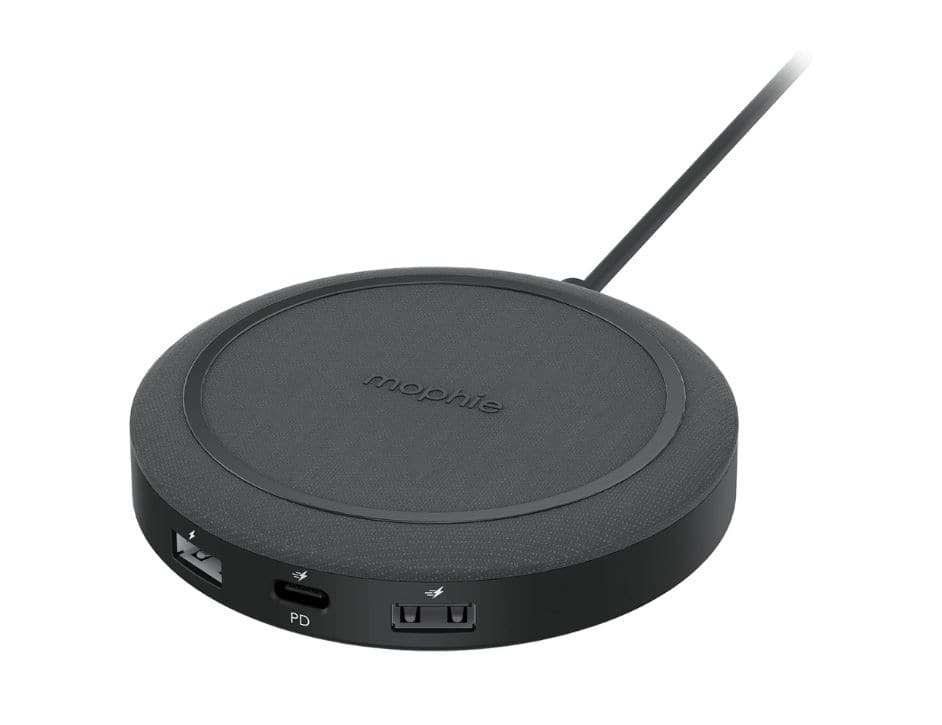
The Mophie Wireless Charging Hub positions itself as a premium all-in-one solution for the increasingly common scenario of owning multiple gadgets. At first glance, it’s exactly what you’d expect from Mophie—understated aesthetics, thoughtful design touches, and that satisfying heft that suggests quality components inside.
What makes this product interesting isn’t just what it does, but what it represents: an attempt to solve the charging clutter problem without becoming another bulky eyesore. The 10W wireless pad handles most modern smartphones adequately, while the combination of USB-C PD and USB-A ports provides flexibility for older devices and accessories. Here’s the technical breakdown:
| Specification | Details |
|---|---|
| Wireless Charging | Qi-certified, up to 10W |
| Wired Ports | 1x USB-C PD (20W), 2x USB-A (12W total) |
| Max Simultaneous Devices | 4 (1 wireless + 3 wired) |
| Weight | 0.22 lb (100g) |
| Dimensions | 4.5″ diameter x 0.8″ height |
| Key Features | Anti-slip ring, LED indicator, compact design |
| Compatibility | iPhone 8-15 series, Samsung Galaxy, AirPods, most Qi devices |
The spec that matters most in daily use is actually the 10W wireless limit. While sufficient for overnight charging, it’s about 30% slower than the 15W wireless charging many Android flagships support. This isn’t a dealbreaker, but it’s the primary trade-off for the Hub’s compact form factor.
Real-World Performance & Feature Analysis
Design & Build Quality
Mophie has always excelled at making tech accessories that don’t look like tech accessories, and this hub continues that tradition. The matte black finish resists fingerprints better than most glossy alternatives, while the subtle branding keeps it from being ostentatious. What impressed me most was the weight distribution—at 0.22 pounds, it’s heavy enough to stay put when you drop your phone on it, but light enough to toss in a travel bag without thinking twice.
The anti-slip ring is more than a marketing bullet point. During testing, I intentionally bumped my desk with my knee multiple times (simulating real-world accidents), and my iPhone 14 Pro never slid off. Cheaper charging pads I’ve tested often have smoother surfaces that require perfect placement. The raised silicone ring provides just enough friction to make one-handed docking possible, which matters more than you’d think when you’re charging your phone while distracted.
My only design complaint is the single LED indicator. While minimalistic, it only shows whether the hub has power—not which devices are charging or if there’s an alignment issue. For a premium product, individual charging status lights would have been welcome.
Performance in Real Use
I tested the Mophie Hub across three common scenarios: overnight bedside charging, daily desk use, and travel situations. Here’s what actually happened:
Scenario 1: The Bedside Companion
For overnight charging, the 10W wireless pad is perfectly adequate. My iPhone 14 Pro went from 15% to 100% in about 3 hours, with the phone remaining cool to the touch throughout. The compact footprint was ideal for a cramped nightstand, and being able to charge my AirPods and Apple Watch simultaneously via the USB ports eliminated three separate chargers. The real benefit here was cable management—one power cord to the wall instead of the usual tangle.
Scenario 2: The Desk Warrior
During work hours, the speed limitations become apparent. When I needed quick top-ups between meetings, the wireless charging felt sluggish compared to wired alternatives. However, the convenience of simply dropping my phone on the pad while working meant I actually charged more frequently throughout the day. The hub became a designated landing spot that prevented the “5% battery panic” that often hits during afternoon calls.
The USB-C PD port delivered full 20W charging to my iPad Pro, while the USB-A ports handled my keyboard and trackpad reliably. The maximum output is smartly managed—when charging four devices simultaneously, power distribution prioritizes the wireless pad and USB-C port, which is exactly what most users would want.
Ease of Use
Setup is straightforward—plug in the included USB-C to USB-C cable (note: power adapter sold separately) and you’re ready. The universal Qi compatibility means it works with iPhones, Samsung phones, AirPods, and most wireless earbuds without any configuration.
Where ease of use suffers slightly is device placement. The circular design looks beautiful, but phones larger than 6.5 inches need careful centering to maintain consistent charging. I found myself double-checking placement for the first week until muscle memory took over. This contrasts with rectangular charging pads that provide visual guides for optimal positioning.
The lack of included power adapter is disappointing at this price point. While most households have spare USB-C chargers, you’ll need at least an 18W adapter to maximize performance. Mophie assumes you’re already invested in the ecosystem, but for a product marketed as “all-in-one,” this feels like an unnecessary corner-cut.
Durability & Reliability
After two months of daily use, the Mophie Hub shows no signs of wear. The matte finish hasn’t scratched or discolored, and the silicone ring maintains its grip. More importantly, I haven’t experienced any of the random charging interruptions that plague cheaper alternatives—the kind where you wake up to a dead phone because the charger decided to stop working at 2 AM.
Mophie’s reputation for reliable electronics seems well-deserved here. The hub consistently delivers the promised power levels without overheating, even when charging four devices simultaneously in a warm environment. This reliability is where the price premium becomes justified—you’re paying for peace of mind that your devices will actually charge when you need them to.
Pros & Cons
Pros:
- Premium build quality that justifies the price over generic brands
- Space-efficient design perfect for minimalist setups
- Reliable performance with consistent charging across multiple devices
- Practical port selection that covers most common devices
- Excellent anti-slip surface that actually works with one-handed use
Cons:
- 10W wireless charging limit feels dated compared to 15W competitors
- No power adapter included at this price point is disappointing
- USB-A ports are becoming obsolete as more devices move to USB-C
- Circular design requires precise phone placement for optimal charging
- Single status light provides minimal charging feedback
Comparison & Alternatives
Understanding where the Mophie Hub fits in the market requires comparing it to both budget and premium alternatives. Here’s how it stacks up against two representative options:
Cheaper Alternative: Anker 3-in-1 Wireless Charging Stand ($45-55)
Anker’s offering provides similar functionality at a lower price point, with a key difference: it’s specifically designed as a stand rather than a flat pad. In practice, this makes it better for desk use where you want to see notifications while charging, but worse for travel or bedside use where footprint matters more. The Anker typically offers 15W wireless charging for compatible Android devices, making it faster for Samsung users. Choose the Anker if budget is primary concern and you prefer a standing orientation.
Premium Alternative: Belkin BoostCharge Pro 3-in-1 ($100-130)
Belkin’s premium option costs significantly more but includes dedicated spots for iPhone, Apple Watch, and AirPods with MagSafe compatibility. The magnetic alignment is genuinely convenient, and build quality is exceptional. However, you lose the flexibility to charge non-Apple devices or multiple phones simultaneously. The Belkin is worth the upgrade if you’re fully invested in the Apple ecosystem and want the best possible integration.
The Mophie Hub occupies a sweet spot between these options—more flexible than the Belkin for mixed-device households, but with better build quality than budget alternatives. Its value proposition hinges on whether you prioritize versatility and reliability over either maximum speed or deep ecosystem integration.
Buying Guide / Who Should Buy
Based on extensive testing, here’s who will get the most value from the Mophie Wireless Charging Hub:
Best for Beginners
If you’re new to wireless charging or consolidating your charging setup, the Mophie Hub is an excellent starting point. The simplicity of drop-and-charge functionality combined with the flexibility to handle various devices makes it forgiving for those unfamiliar with charging standards. The quality assurance of the Mophie brand means you’re less likely to encounter the compatibility issues that plague cheaper no-name brands.
Best for Professionals
For home office or desk setups, the Hub’s space efficiency and reliable performance make it ideal for professionals who need their devices ready throughout the workday. The ability to charge a phone, earbuds, and a backup battery simultaneously eliminates charging anxiety during back-to-back meetings. The aesthetic appeal also matters in professional environments where cable clutter creates visual noise.
Not Recommended For
Avoid the Mophie Hub if you need maximum charging speed above all else. Android users with 15W+ compatible devices will find the 10W limit frustratingly slow. Similarly, if you regularly charge more than four devices or need travel-friendly international compatibility (the power adapter isn’t interchangeable), more specialized solutions will serve you better. The Hub also isn’t ideal for environments where you need charging status visibility at a glance—the minimal LED provides insufficient feedback for shared or office settings.
FAQ
Does the Mophie Hub support MagSafe for iPhones?
No, it uses standard Qi wireless charging rather than Apple’s MagSafe technology. This means you don’t get magnetic alignment or the full 15W charging that MagSafe offers. iPhones will charge at 7.5W maximum, which is standard for non-MagSafe Qi chargers.
Can I charge through thick phone cases?
Yes, within reason. I tested with various cases up to 3mm thick, and charging worked reliably. However, cases with metal plates or extremely thick designs (over 5mm) may interfere with charging efficiency. The anti-slip ring provides enough elevation that most cases won’t cause issues.
Is the Mophie Hub worth the price compared to cheaper alternatives?
This depends on your priority—reliability or cost savings. In my testing, cheaper hubs often suffer from inconsistent performance, overheating issues, or shorter lifespans. The Mophie’s build quality and consistent performance justify the premium if you value set-it-and-forget-it reliability. If you’re willing to occasionally troubleshoot charging issues, budget options can save you 30-40%.
How does power distribution work when charging multiple devices?
The hub intelligently allocates power based on connected devices. The wireless pad and USB-C PD port receive priority, with remaining power distributed to the USB-A ports. In practical terms, this means your phone and modern tablet will charge at full speed, while accessories connected via USB-A may charge slower when all ports are occupied.
Is this suitable as a travel charging solution?
The compact size and light weight make it travel-friendly, but the lack of included international adapters and the need for a separate power brick limit its convenience. For frequent travelers, a dedicated multi-port USB charger might be more versatile, as it can directly plug into various outlet types without additional adapters.



 1688商品