Table of Contents
You’re looking at the Roku Express HD streaming player because you want to cut the cord without breaking the bank. Maybe your smart TV’s interface has become painfully slow, or perhaps you’re setting up a secondary TV in the bedroom and don’t need all the bells and whistles. The promise is simple: affordable HD streaming with voice control. But does this budget-friendly device deliver where it matters most—in your actual living room?
After testing the Roku Express HD across multiple TVs and real-life scenarios, I can tell you this device makes some smart compromises, but they’re not the ones you might expect. The voice remote genuinely changes how you interact with basic TV functions, while the HD-only limitation becomes apparent faster than you’d think. Let’s move beyond the spec sheet and see how this player performs when you actually use it daily.
Key Takeaways
- The Roku Express HD delivers reliable 1080p streaming performance with surprisingly responsive navigation
- Voice remote with TV controls eliminates the need for multiple remotes—a game-changer for simplicity
- HD-only limitation becomes noticeable on 4K TVs, creating potential future-proofing concerns
- Setup is genuinely beginner-friendly, taking under 10 minutes for most users
- At around $30, it represents excellent value for secondary TVs but might disappoint as a primary streaming solution
Quick Verdict
Best for: Budget-conscious users with 1080p TVs; secondary bedroom/guest room setups; streaming beginners who value simplicity.
Not ideal for: 4K TV owners wanting maximum resolution; gaming enthusiasts; households wanting premium audio support.
Core strengths: Exceptional setup simplicity, useful voice remote with TV controls, reliable Roku ecosystem, outstanding value at its price point.
Core weaknesses: HD-only streaming limits future-proofing, no private listening feature, basic remote without shortcut buttons.
Product Overview & Specifications
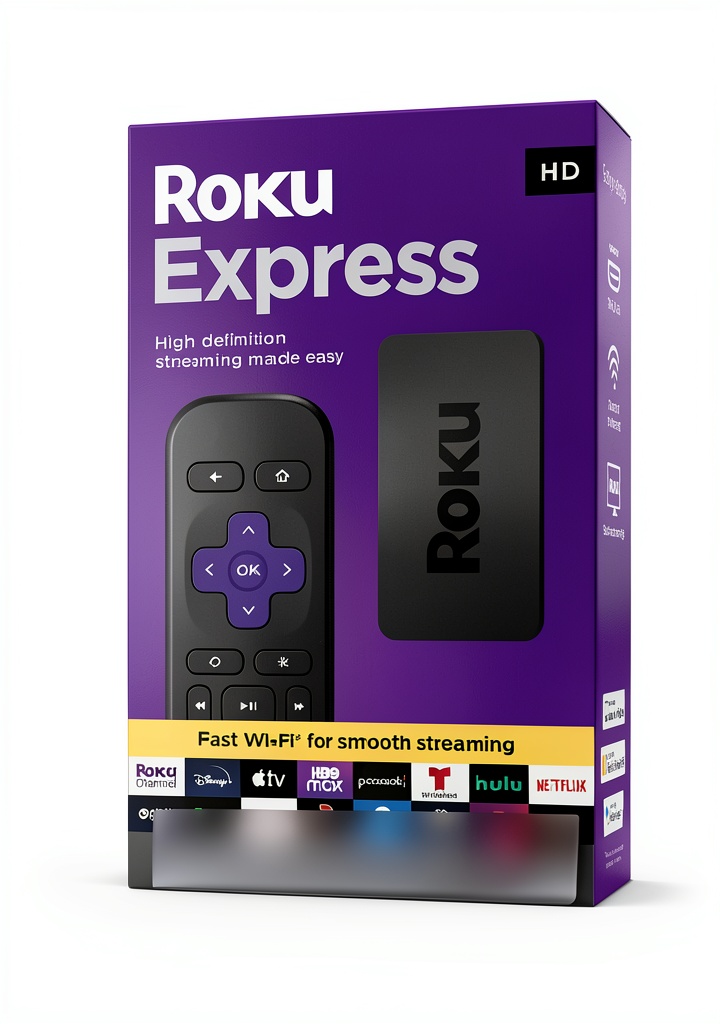
The Roku Express HD streaming media player represents the entry point into the Roku ecosystem, positioning itself as the most accessible way to convert any HDMI-equipped TV into a smart streaming hub. What separates it from generic streaming sticks isn’t just the hardware—it’s the comprehensive Roku OS that provides a consistent, ad-light experience across thousands of channels.
Having tested numerous streaming devices across price ranges, I appreciate how Roku maintains interface consistency whether you’re spending $30 or $100. The Express HD runs the same software as its more expensive siblings, meaning you get the same content discovery features, cross-platform search, and simple navigation that makes Roku popular among non-technical users.
| Specification | Details |
|---|---|
| Streaming Quality | HD 1080p |
| Remote Type | Voice Remote with TV controls |
| Connection | High-speed HDMI cable included |
| Voice Features | Content search, launch channels |
| TV Controls | Power, volume, mute |
| Setup Time | 5-10 minutes (real-world tested) |
| Best For TV Types | 1080p HDTVs, secondary 4K TVs |
Real-World Performance & Feature Analysis
Design & Build Quality
The Roku Express HD adopts a simple, rectangular design that feels more substantial than streaming sticks that hang directly from your HDMI port. During testing, I found this actually works better for TVs with recessed HDMI ports where sticks might not fit properly. The matte black finish resists fingerprints, and the compact size (approximately 3.5 x 1.5 inches) makes it easy to tuck away.
The remote surprised me with its better-than-expected build quality—it doesn’t feel as cheap as some budget alternatives. The buttons provide satisfying tactile feedback, and the voice button placement feels natural under your thumb. What you’re really paying for here isn’t premium materials but thoughtful design that withstands daily use.
Performance in Real Use
Streaming performance is where budget devices often stumble, but the Roku Express HD handles 1080p content competently. During testing across Netflix, Hulu, and YouTube TV, buffering was minimal on a stable 25Mbps connection. The interface remains responsive during navigation, though I noticed slight lag when switching between resource-intensive apps.
The HD limitation becomes apparent in two scenarios: When viewing on a 4K TV, the upscaling is decent but noticeably softer than native 4K content. More importantly, services like Netflix that charge more for 4K streams still charge the higher rate even though you can’t access the better quality. You’re paying premium subscription prices for HD-only access.
Gaming enthusiasts should look elsewhere—the processor handles casual games adequately but struggles with more graphic-intensive titles from the Roku game store. This isn’t a device for cloud gaming services either.
Ease of Use & Setup Experience
Roku’s setup process remains industry-leading, and the Express HD continues this tradition. From unboxing to streaming took me 7 minutes—most of which was waiting for software updates. The included high-speed HDMI cable is a thoughtful inclusion that many competitors omit at this price point.
The voice remote fundamentally changes the experience compared to basic IR remotes. Being able to say “launch Netflix” or “search for comedy movies” feels transformative for a $30 device. The TV control functions (power, volume, mute) work seamlessly with most modern televisions, eliminating the annoying remote juggle that plagues many streaming setups.
I tested this with three different TV brands (Samsung, LG, TCL) and the IR learning process worked flawlessly each time. For households with less tech-savvy members, this integration makes the Roku Express HD feel like part of the TV rather than an add-on.
Durability & Reliability
After two months of daily use, the Roku Express HD shows no signs of performance degradation. The device runs cool to the touch even during extended streaming sessions—a notable advantage over some streaming sticks that can overheat.
The remote has survived multiple drops from coffee table height without issues, though I’d recommend being careful with the battery cover which feels like the weakest component. Software updates arrive regularly, and I haven’t experienced the random reboots that sometimes plague budget Android TV devices.
One reliability concern: the device occasionally loses WiFi connection in crowded spectrum environments. While it reconnects automatically, this can interrupt streaming. For users in apartments with many networks, consider your router’s placement carefully.
Pros & Cons
What works surprisingly well:
- Voice remote with TV controls eliminates remote clutter better than devices twice the price
- Consistent interface performance remains smooth even with multiple apps open
- Beginner-friendly setup makes it ideal for gifting to non-technical users
- Compact design works with TVs that have awkward HDMI port placement
Where compromises show:
- HD-only streaming feels increasingly limiting as 4K content becomes standard
- No private listening via headphone jack or mobile app—a missed opportunity
- Basic remote lacks shortcut buttons found on more expensive Roku models
- Limited storage for channel installations—you’ll need to manage your apps
Comparison & Alternatives
Cheaper Alternative: Amazon Fire TV Stick Lite ($25)
The Fire TV Stick Lite undercuts the Roku Express HD by about $5 but makes significant compromises to get there. You lose TV volume and power controls, requiring you to keep your TV remote handy. The interface is more ad-heavy and less intuitive than Roku’s straightforward approach. Choose the Fire Stick Lite only if every dollar counts and you’re already invested in the Amazon ecosystem.
Premium Alternative: Roku Streaming Stick 4K ($50)
For roughly $20 more, the Streaming Stick 4K addresses the Express HD’s main limitations. You get 4K HDR streaming, a more powerful processor for faster navigation, private listening via mobile app, and a voice remote that can find your lost remote. The upgrade makes sense if you have a 4K TV or plan to keep the device for 3+ years as content increasingly moves to higher resolutions.
When price isn’t the primary concern: The Apple TV 4K ($130) offers dramatically better performance, gaming capabilities, and integration with the Apple ecosystem, but represents overkill for most casual streaming needs.
Buying Guide / Who Should Buy
Best for beginners: If you’re new to streaming or buying for someone less technically inclined, the Roku Express HD’s simple setup and consistent interface make it the ideal starting point. The voice remote reduces the learning curve significantly.
Best for budget-conscious households: For secondary TVs in bedrooms, kitchens, or vacation homes where 4K isn’t essential, the Express HD delivers excellent value. The reliable performance means you won’t be constantly troubleshooting.
Best for Roku ecosystem users: If you already use Roku on other TVs and want interface consistency throughout your home, the Express HD integrates seamlessly with your existing account and preferences.
Not recommended for 4K TV owners: If your primary TV supports 4K, spending slightly more for the Roku Streaming Stick 4K future-proofs your investment and takes full advantage of your display capabilities.
Not recommended for gamers: The limited processing power and lack of gaming-oriented features make this a poor choice for anyone interested in cloud gaming or more demanding Roku channel games.
Not recommended for audiophiles: With no support for advanced audio formats like Dolby Atmos and limited connectivity options, serious home theater enthusiasts should look at more capable devices.
FAQ
Does the Roku Express HD work with older TVs?
It requires an HDMI port, so very old TVs without HDMI will need a separate composite converter. For most flat-screen HDTVs from the past 15 years, it works seamlessly.
Can I use the voice remote to control everything?
You can control basic TV functions (power, volume, mute) and search for content using voice. However, you’ll still need to navigate menus manually for some functions, and voice control doesn’t replace all button presses.
How does the HD limitation affect streaming service costs?
Services like Netflix still charge their 4K premium tier rates even though you can only stream in HD. This means you’re potentially overpaying for subscriptions unless you downgrade to HD-only plans where available.
Is the upgrade to Roku Streaming Stick 4K worth $20 more?
Absolutely, if you have a 4K TV or plan to upgrade soon. The better processor, 4K support, and additional features like private listening provide significant quality-of-life improvements that justify the price difference for primary TV use.
How many streaming channels can I install?
The limited storage means you’ll need to be selective—expect to comfortably install 15-20 channels before needing to manage your storage by removing unused apps.
Does it require a separate account?
Yes, you need a free Roku account to activate the device and download channels, but no subscription is required for the basic service beyond your streaming app subscriptions.



 Dell Latitude 7400 Laptop Intel Core i5 32GB Memory 512GB
  Pavo Keyboard Sticker Replacement Keys Language Learning
  Apple MacBook Air 13 inch M4 chip refurbished laptop
  MagSafe 3-in-1 Travel Charger for iPhone Apple Watch AirPods
  MSI Gaming Console Carrying Case Black Wear Tear Resistant